Cloud Automation
Ops-Pilot
An Omninex environment lifecycle automation framework for AWS training labs, technical demos, and repeatable cloud operations workflows.
Built for repeatable AWS environments, training operations, and controlled demo infrastructure
Product Overview
Repeatable cloud environments without manual drift.
Ops-Pilot centralizes the routine work around cloud lab delivery: selecting the right workspace context, validating the active AWS account, deploying CloudFormation or SAM templates, syncing supporting assets, connecting to live instances, and tearing environments down safely.
Account-Safe Deployments
Validates the active AWS account before deployment actions run, reducing the risk of accidental cross-account provisioning.
Dynamic Workspace Context
Discovers local ops-pilot.conf files by walking the workspace tree and applying project-specific runtime context.
Lifecycle Automation
Coordinates deployment, connection, asset synchronization, orchestration triggers, and teardown from a single CLI workflow.
Architecture
A CLI control plane for AWS lab operations.
Ops-Pilot acts as the local operator interface between a developer workspace and the AWS resources used for training, demos, and controlled proof-of-concept environments.
1. Workspace Control Center
Ops-Pilot loads a base config, discovers workspace overrides, and establishes the correct project/environment context before touching AWS resources.
2. AWS Safety Gate
The CLI initializes a boto3 session, validates the current AWS identity against the expected account, and then creates scoped clients for CloudFormation, EC2, S3, SSM, and Lambda workflows.
3. Deploy and Sync Pipeline
CloudFormation or SAM templates deploy infrastructure while metadata-driven sync logic uploads utilities and week-specific assets to the correct S3 destinations.
4. Connect and Teardown Controls
Tag-based EC2 discovery, cross-region SSM key lookup, temporary SSH/RDP handling, and guarded S3 bucket cleanup support controlled operational access and teardown.
Lifecycle View
From workspace to teardown
The flow below replaces the raw Mermaid graph with a clearer product-facing view of how Ops-Pilot moves an AWS lab from local context to safe cleanup.
Step 01
Select workspace context
Ops-Pilot loads the base configuration, then applies local ops-pilot.conf overrides so each lab or demo uses the right project context.
Step 02
Validate the AWS account
Before provisioning begins, the account gatekeeper checks the active STS identity against the expected account ID.
Step 03
Deploy the environment
CloudFormation or SAM templates create the stack with predictable naming, capabilities, parameters, and no-fail empty changesets.
Step 04
Sync supporting assets
Utilities and week-scoped files are uploaded to S3 only when file metadata explicitly marks them for Ops-Pilot delivery.
Step 05
Connect to live instances
EC2 tag discovery finds the target instance, resolves its stack context, retrieves key material from SSM, and launches SSH or RDP.
Step 06
Tear down with guardrails
Destroy actions require confirmation and validate bucket ownership with stack, project, and prefix checks before cleanup proceeds.
CLI Workflow
One command path for deploy, connect, sync, and destroy.
Ops-Pilot provides a practical command path for repeatable infrastructure workflows: deploy, connect, synchronize assets, and destroy environments with safety checks built into the flow.
| Action | Command | Operational Outcome |
|---|---|---|
| Deploy | python ops-pilot.py deploy lab.yaml --name w01 | Creates a predictable stack name, deploys CloudFormation/SAM, and syncs assets after a stable deployment. |
| Connect | python ops-pilot.py connect DemoWindows01 | Finds a running EC2 instance by Name tag, discovers its stack context, and launches the correct connection path. |
| Sync | python ops-pilot.py sync w01 | Uploads shared utilities and week-scoped assets using file metadata and stack outputs. |
| Destroy | python ops-pilot.py destroy ops-pilot-w01 | Runs explicit confirmation and bucket safety checks before deleting the CloudFormation stack. |
Safety Controls
Automation with guardrails.
Ops-Pilot is not just a deploy script. It includes control points for identity validation, resource discovery, scoped asset movement, and guarded cleanup so training or demo environments can move quickly without becoming unmanaged infrastructure.
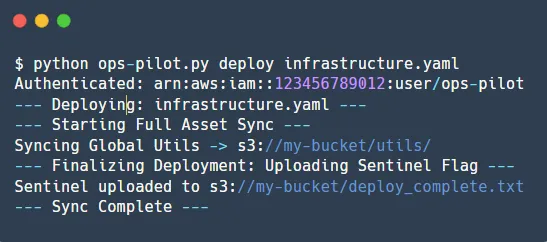
$ ops-pilot deploy lab.yaml --name w01
# validate account, deploy stack, sync assets
$ ops-pilot destroy ops-pilot-w01
# confirm target, validate bucket tags, teardown safely
Account Gatekeeper
STS identity check against ExpectedAccountId
Prevents accidental deployment into the wrong AWS account.
Stack Context Discovery
EC2 Name tag lookup plus CloudFormation stack-name tag discovery
Lets the CLI connect to the correct infrastructure context without hardcoded stack references.
Cross-Region Key Lookup
SSM Parameter Store search across enabled regions
Supports SSH/RDP access when the key material is stored outside the active deployment region.
Metadata-Routed Sync
OPS_PILOT_UPLOAD and OPS_PILOT_DEST file headers
Uploads only intended assets to controlled S3 paths.
Bucket Safety Gate
CloudFormation tag, Project tag, and bucket-name prefix checks
Blocks unsafe bucket purges during teardown.
Roadmap
From lab utility to packaged environment platform.
Configuration Hardening
Add schema validation for config.json and ops-pilot.conf so deployment errors fail earlier and with clearer messages.
Packaged CLI Release
Package Ops-Pilot as an installable CLI with versioned commands, generated help output, and documented workspace conventions.
Operator Dashboard
Expose stack state, asset sync status, idle scan actions, and teardown readiness through a lightweight operator view.

Repeatable cloud operations for technical teams.
Ops-Pilot brings deployment, asset synchronization, secure instance access, and guarded teardown into a single workflow for teams that need repeatable AWS training and demo environments.